
{tab title="ผล Speed Test "}
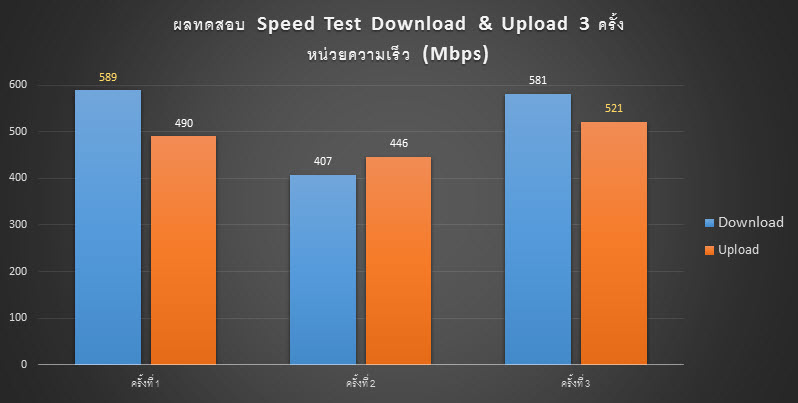
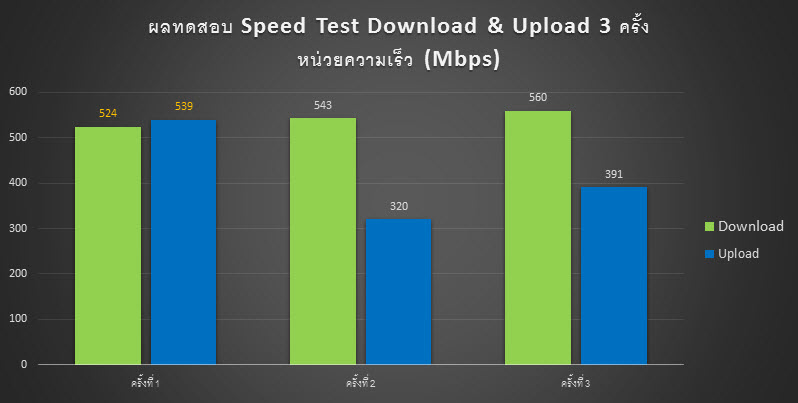
| 1. ผล Speed Test Wi-Fi 5GHz ระยะไม่เกิน 5 เมตร | |
|---|---|
|
1.1. Huawei Mate 20 ได้ความเร็ว Download สูงสุด 589Mbps และ Upload 521Mbps |
|
|
|
|
|
1.2. iPhone 11 ได้ความเร็ว Download สูงสุด 524Mbps และ Upload 539Mbps |
|
|
|
|
| * Huawei Mate 20 และ iPhone 11 เชื่อมต่อ Wireless 5GHz ที่ความเร็ว 867Mbps | |
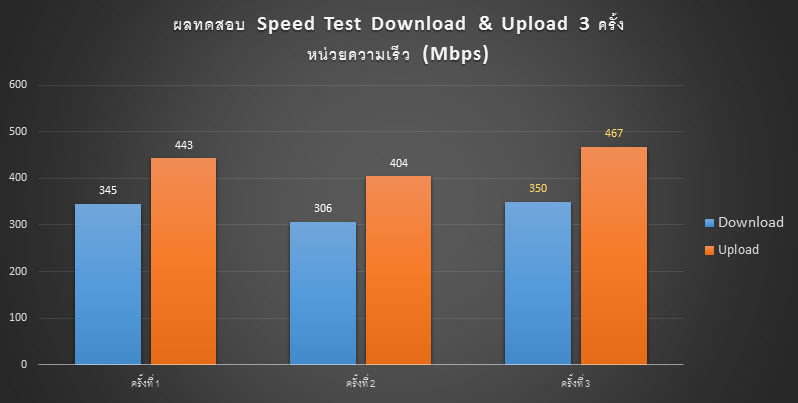
| 2. ผล Speed Test Wi-Fi 5GHz ระยะเกิน 5 เมตร มีกระจกกั้น | |
|
2.1. Huawei Mate 20 ได้ความเร็ว Download สูงสุด 350Mbps และ Upload 467Mbps |
|
|
|
|
{tab title="Specifications"}
| HARDWARE FEATURES |
|
|---|---|
| Processor | Qualcomm Atheros @775MHz (1 Core) |
| Ram/Rom | 128MB/8MB |
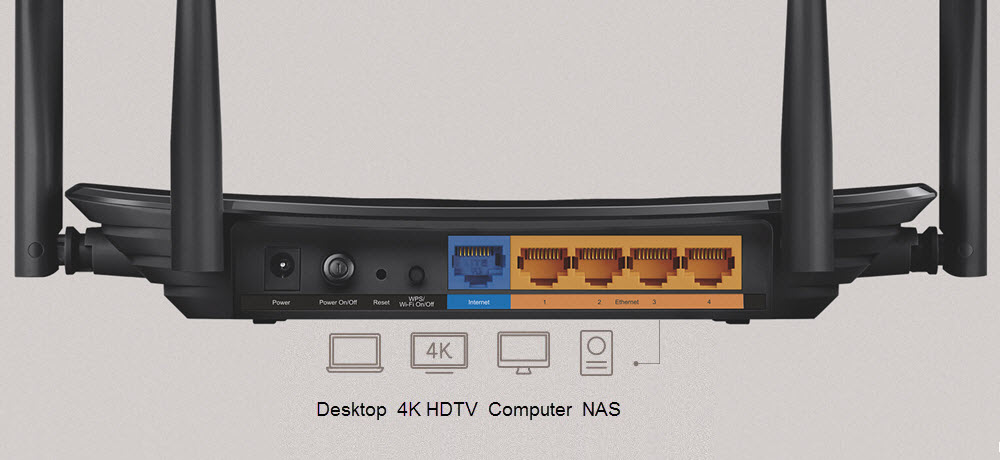
| Interface | 4 x 10/1000Mbps LAN Ports, 1 x 10/1000Mbps WAN Port |
| Button | Reset Button, Power On/Off Button, WPS/Wi-Fi On/Off Button |
| Antenna | 4 External Antennas, 1 Internal Antenna |
| External Power Supply | 12V/1A |
| Dimensions ( W x D x H ) | 9.1 × 5.7 × 1.4 in (230 × 144 × 35 mm) |
| WIRELESS FEATURES |
|
|---|---|
| Wireless Standards | IEEE 802.11ac/n/a 5GHz IEEE 802.11b/g/n 2.4GHz |
| Frequency | 2.4GHz and 5GHz |
| Signal Rate | 5GHz: Up to 867Mbps 2.4GHz: Up to 450Mbps |
| Wireless Security | 64/128-bit WEP, WPA / WPA2, WPA-PSK/ WPA2-PSK encryption |
| Wireless Functions | Enable/Disable Wireless Radio WDS Bridge, WMM, Wireless Schedule, Wireless Statistics |
| Wireless Mode | AP, Range Extender |
| SOFTWARE FEATURES |
|
|---|---|
| WAN Type | Multi- EWAN, Dynamic IP, Static IP, PPPoE, PPTP, L2TP |
| DHCP | Server, DHCP Client List, Address Reservation |
| Port Forwarding | Virtual Server, Port Triggering, UPnP, DMZ |
| Dynamic DNS | DynDns, NO-IP |
| Access Control | Parental Controls, Local Management Control, Host List, White List, Black List |
| Firewall Security | DoS, SPI Firewall, IP and MAC Address Binding |
| Protocols | IPv4, IPv6 |
| Management | Access Control, Local Management, Remote Management, TR-069,TR-098,TR181,TR-111,TR143 |
| OTHERS |
|
|---|---|
| Certification | CE, RoHS |
| Environment | Operating Temperature: 0℃~40℃ (32℉ ~104℉), Operating Humidity: 10%~90% non-condensing Storage Temperature: -40℃~70℃ (-40℉ ~158℉), Storage Humidity: 5%~90% non-condensing |
| System Requirements | Microsoft Windows 10/8.1/8/7/Vista/XP/2000/NT/98SE, MAC OS, NetWare, UNIX or Linux Internet Explorer 11, Firefox 12.0, Chrome 20.0, Safari 4.0, or other Java-enabled browser Cable or DSL Modem Subscription with an internet service provider (for internet access) |
| PACKAGE CONTENTS |
|
|---|---|
| Package Contents | Wireless Router EC230-G1 Power Adapter RJ45 Ethernet Cable Quick Installation Guide |
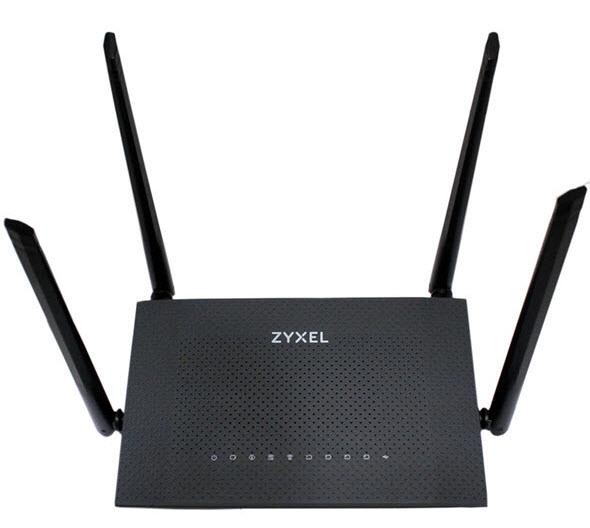 |
AC1300 Wireless Dual Band Gigabit Router
|
|
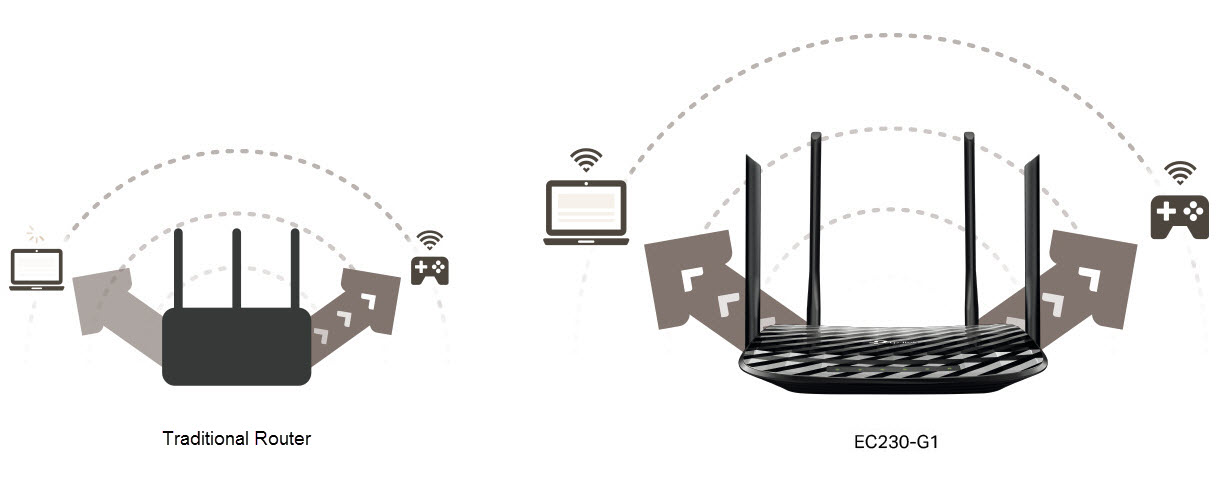
Zyxel รุ่น EMG2881-T20B เป็น Router Wireless ที่ออกแบบมาเพื่อตอบโจทย์ผู้ใช้ทั่วไป โฮมออฟฟิต หรือบริษัทขนาดเล็กและกลาง ที่มองหา Router Wireless ที่มีประสิทธิภาพสูงในราคาที่ไม่แพงมาก รองรับ Internet ความเร็วสูงในปัจจุบัน สามารถกระจายสัญญาณให้ Wireless Clients หลายเครื่องได้เชื่อมต่อใช้งานพร้อมกัน ได้ความเร็วเฉลี่ยใกล้เคียงกันในระดับที่น่าพอใจ มาพร้อม เทคโนโลยี Wireless AC มาตรฐานยุคใหม่ล่าสุด ตัวอุปกรณ์มาพร้อม CPU ชนิด Dual Core และ Ram ขนาด 128MB ช่วยประมวลผลเร็วขึ้น รองรับจำนวน Clients ได้เยอะขึ้น รองรับการกระจายสัญญาณแบบ Dual-Band พร้อมกัน 2 ความถี่ ให้ความเร็วในการเชื่อมต่อที่ความถี่ 2.4GHz จะได้สูงสุด 400Mbps และความเร็วที่ความถี่ 5GHz จะได้สูงสุดถึง 867Mbps ทำให้ความเร็วรวมสูงสุดถึง 1300Mbps ตอบโจทย์ผู้ใช้ที่มี ไลฟ์สไตล์ ในการใช้งานที่เน้น Bandwidth และ Internet ความเร็วสูงในปัจจุบันได้อย่างสบาย ตัวอุปกรณ์มาพร้อมเสาภายนอกขนาด 5dBi จำนวน 4 เสา ทำงานด้วยเทคโนโลยี MU-MIMO ช่วยเพิ่มประสิทธิภาพและความเร็วในการรับส่งข้อมูลกับ Wireless Client หลาย Devices พร้อมกัน ได้ดีกว่า Single-MIMO |
|
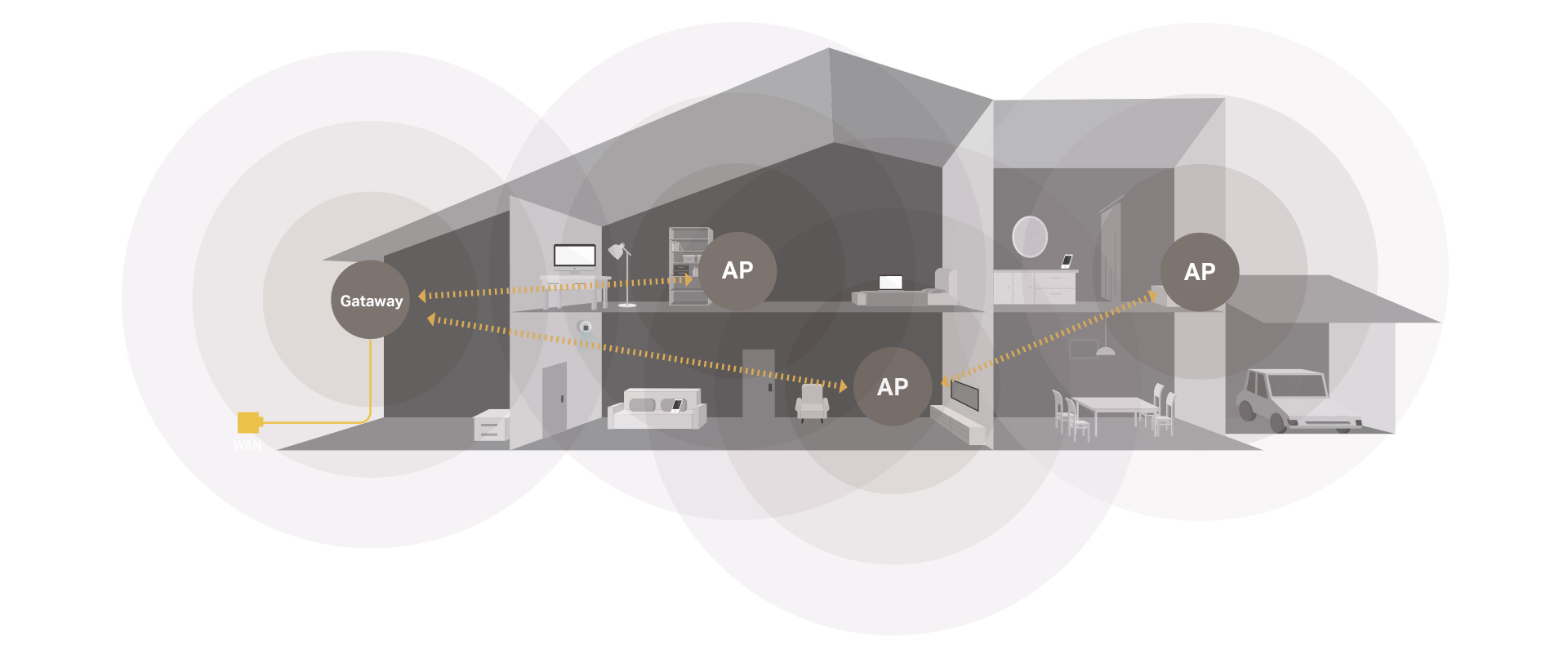
Wi-Fi RoamingAP Steering and Band Steering features ensure seamless handover while moving through the home. You can match multiple devices to provide a seamless, intelligent and easy-to-configure mesh network that covers the entire home. |
|
 |
|
MU-MIMO
|
|
 |
|
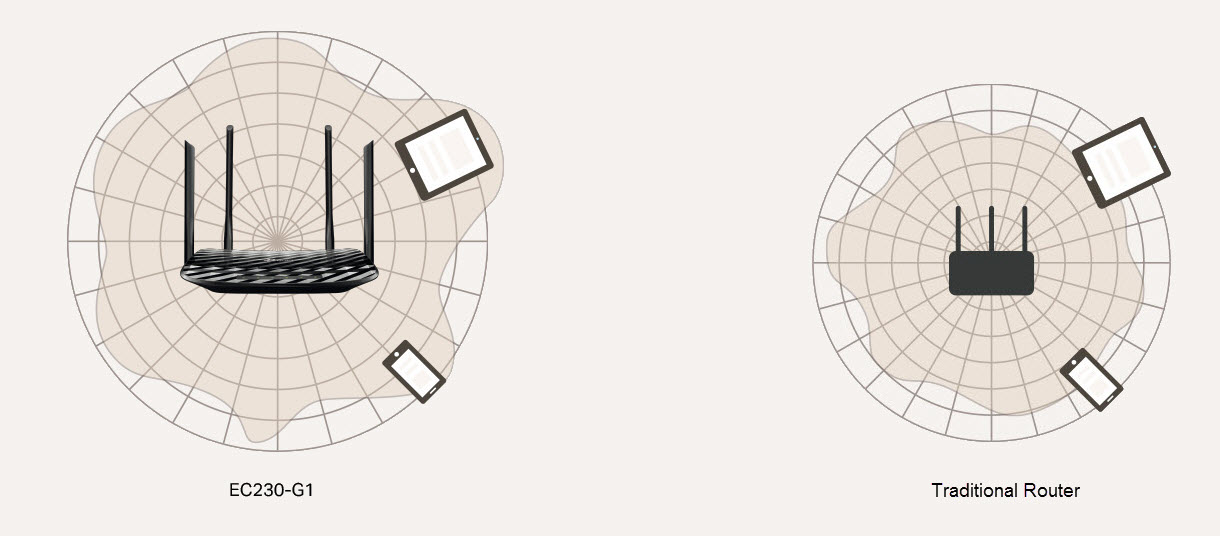
Beamforming for Better CorverageBeamforming technology detects the location of your connected devices and concentrates the EC230-G1's Wi-Fi towards them to create stronger overall connections. |
|
 |
|
 |
Faster Wi-Fi for
|
Gigabit EthernetEnjoy fast, reliable wired connections for gaming and streaming in the best quality. |
|
|
|
|
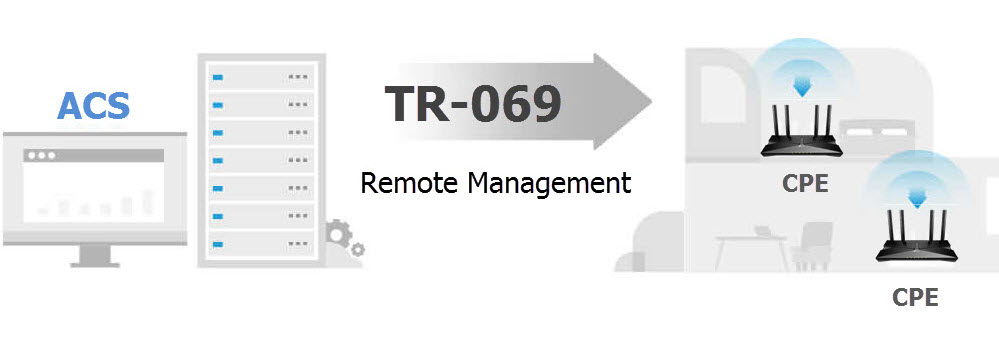
Support TR-069 Remote Managementด้วยระบบ ACS หรือ Auto Configuration Service ทำให้ผู้ให้บริการ Internet สามารถ Remote จัดการ ปรับเปลี่ยนค่า Config รวมถึงบำรุงรักษา และ Monitor อุปกรณ์ CPE ปลายทางทั้งแบบกลุ่ม หรือแบบเดี่ยวได้อย่างสะดวก |
|
 |
|
{/tabs}